

February 7, 2023
Netography Fusion now offers global filtering, response integration testing, additional dashboard bar/line/area chart customization for widgets, and more enhancements throughout the portal.
New Features
Portal
Global Filters now have the ability to filter for all NQL types at the same time when a page or dashboard has widgets in it of different types. e.g. you can have a flow filter set in addition to an alert filter set.
The “active filter” indicators in the header has been revisited to make it more apparent that data on screen has a filter present
Integrations can now be tested. You can now execute a test to ensure API connection settings are still working or if you want to see a sample result from the integration.
Threat Detection Models have been renamed Detection Models, to represent that the fact that models can be configured for any resource thresholds, in addition to specific threat alerting.
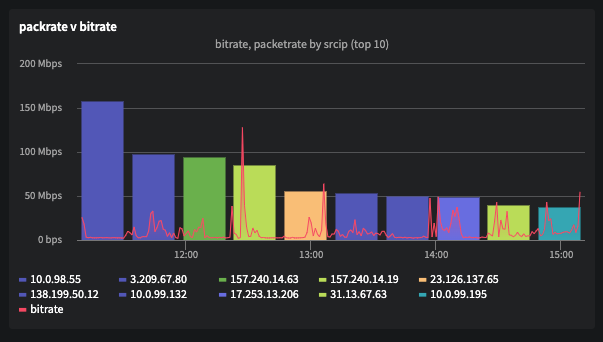
Dashboard bar, line, and area charts can now be combined in the same widget. A 2nd chart will use the right-hand y-Axis.
Enhancements
Portal
Alert/Block Table Widgets: Links are now added to the details page
Global Filters: Netography Fusion can now search multiple NQL types at the same time
Static colors are now defined for charts using a geo country series
Threat Detection Models now renamed to Detection Models
Custom Detection Models: Added “push NQL to GF” for each search
Flow Outages: Instead of an aggregate area chart, Netography Fusion now shows an area chart for each affected flow source
Detection Models: Netography Fusion can now bulk manage Bypass Policies and Hide Events
UX: System and Custom tabs are now standardized across the portal
API
Netography Fusion now pre-populates a name context for IPs for easier context differentiation
Alert/Block: NQL Suggestions now added for
tdm.name,tdm.id, andtdm.descriptionvalues.
Integrations
Portal
Syslog Integration: Can now skip SSL verification in Self Signed TLS response integration
Response Integrations: Now show if a template is assigned. As the email format has been customized, please contact support to request changes
Integrations: For each response integration, you can now run a test to ensure the API connection settings are still working or if you simply want to see a sample result from the integration
CrowdStrike Context Integrations: Filter and sort fields added to both CrowdStrike Falcon Protect and CrowdStrike Falcon Discover for optional FQL strings
Other bug fixes and improvements
Portal
Audit Logs: Should no longer see incorrect error messages when searching past retention
Tables: Last page no longer shows empty records
IP Explorer: Titles are now brought to front the if hovered on
TDM Form: Saved NQL searches no longer show in the "Thresholds" field
IP Explorer: Menus now redraw on window resizing
Tables: Pagination/page size resets after new search
TDMs: UX should now allow as many NQL Searches as available within the dropdown
There is now a space space between the Intel categories on the IP Intelligence page
Tables: Should no longer have blinking columns at the first rendering
Traffic Miner: aggregate series should now display correct output
Potential Dashboard ID not found error when a reseller masquerades
CR/LF pasted into NQL causes invalid NQL expressions
Traffic Manager: Remove action not applicable once block has expired
Tables: Display name and description for tdm field for Event table instead of [Object object]
Tables: Selected option is displayed incorrectly
Tables: Buggy resizing behavior
Traffic Manager block details breadcrumb
Date formatter: Milliseconds in a wrong place in 12h format
Events: Page data should no longer be jumping while the websocket start/stops
Network Top: Aggregate by nested fields should now display correctly
IP Explorer: Can now read properties of undefined (reading 'src')
Bar Charts: Tooltip should no longer disappear
Tables: Paginations should no longer reset to page 1 when new searches are run
Filtering by expiration now working on block table
Fixed data for agg request with size=0 for bar chart in widgets
API
NQL Suggestions: Site should now include VPC regions
Now able to use API keys with websockets
Last updated